Quick start
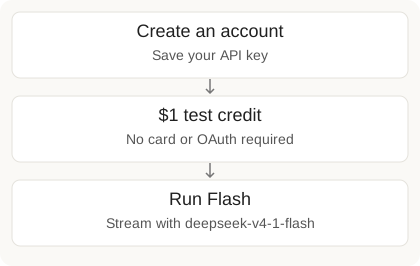
Run your first agent. New API accounts get $1 test credit on one model — no card and no OAuth required.
Python
1. Install
pip install -U "m8tes>=4.47.0"2. Create your account
Already registered? Get your key from the Developer dashboard.
from getpass import getpass
import m8tes

account = m8tes.signup("you@example.com", getpass("Choose a password: "), "yourname")
print(account.api_key)
Set the key in your terminal:
export M8TES_API_KEY=m8_your_key_here3. Run your first agent
Try the API with $1 test credit
API signups get $1 promotional prepaid credit. Spend it on deepseek-v4-1-flash only. Other gateway models need a top-up or a connected provider. One in-flight run at a time on the test balance. The first reply can take up to a minute while your agent's sandbox starts.
from m8tes import M8tes

client = M8tes()  # reads M8TES_API_KEY
print("Starting your agent (the first reply can take up to a minute)...")

# $1 API test credit — this model only until you top up or connect a provider
for chunk in client.runs.stream_text(
    message="Draft a warm reply to a customer asking to cancel.",
    user_id="hello_world",
    model="deepseek-v4-1-flash",
    raise_on_error=True,
):
print(chunk, end="", flush=True)Need the run id (to download files the agent wrote)? Use runs.create(stream=True) and read stream.run_id after the loop. stream_text yields only text chunks.
Develop on your model subscription
Prefer an external model provider for personal development (Hobby). Connect it, then run a matching model — that path does not spend prepaid credit.
- Open Account → Model providers.
- Connect an external model provider and finish sign-in on the provider page.
- Wait for Connected, then run with a matching model (example below uses Grok).
Connecting activates Hobby on eligible trial/inactive accounts. Your usage limits and Hobby's run allowance still apply.
Using a different provider? Follow provider setup and choose a matching model.
Example: connect xAI in Python
Run this once. Open the printed URL, enter the code, and leave the script running until it prints Connected.
import time
from m8tes import M8tes

client = M8tes()
auth = client.model_connections.authorize("xai")
print("Open:", auth.authorization_url)
print("Enter code:", auth.user_code)

deadline = time.monotonic() + 600
while auth.status == "pending":
    if time.monotonic() >= deadline:
        raise TimeoutError("Connection timed out. Run this script again.")
    time.sleep(max(auth.interval_seconds, 1))
    auth = client.model_connections.authorization_status("xai", auth.state)

if auth.status != "connected":
    raise RuntimeError("Connection failed: " + auth.status)
print("Connected. Run the Grok example below.")from m8tes import M8tes
client = M8tes() # reads M8TES_API_KEY
# Personal development only: this disables strict user_id checks account-wide.
# This persists. For customer-facing apps, keep strict mode on and pass user_id.
client.settings.update(require_end_user_id=False)
# Connect a model provider first: https://m8tes.ai/account
for chunk in client.runs.stream_text(
message="Draft a follow-up for Acme's stalled renewal — SSO pricing and a Q3 start.",
model="grok-4.6", # match whatever provider you connected
raise_on_error=True,
):
print(chunk, end="", flush=True)Keep user_id out of personal development runs. Billing details.
Production embeds use prepaid
Same call as the first run: set user_id to your customer's id. These runs debit the prepaid wallet. New API accounts include $1 test credit on deepseek-v4-1-flash; top up for the full catalog and sustained traffic. More: Multi-tenancy.
HTTP equivalent
read -rs -p "Choose a password: " M8TES_PASSWORD; echo
curl -X POST https://api.m8tes.ai/api/v2/signup \
  -H "Content-Type: application/json" \
-d "{\"email\": \"you@example.com\", \"password\": \"$M8TES_PASSWORD\", \"first_name\": \"yourname\"}"curl -X POST https://api.m8tes.ai/api/v2/runs \
-H "Authorization: Bearer $M8TES_API_KEY" \
-H "Content-Type: application/json" \
-d '{"message": "Draft a warm cancellation reply.", "user_id": "hello_world", "model": "deepseek-v4-1-flash", "stream": false}'Next for Python: Agents · Runs · Multi-tenancy · Testing (MockM8tes)
TypeScript
Backend agents in Node. Full surface: TypeScript SDK.
Install
npm i @m8tes/sdkGet a key from the Developer dashboard, then:
export M8TES_API_KEY=m8_your_key_hereFirst run ($1 test credit)
import { M8tes } from "@m8tes/sdk";

const client = new M8tes();
console.log("Starting your agent (the first reply can take up to a minute)...");
const run = client.runs.create({
  message: "Draft a follow-up for Acme's stalled renewal — SSO pricing and a Q3 start.",
  user_id: "hello_world",
  model: "deepseek-v4-1-flash",
}, { raiseOnError: true });

for await (const chunk of run.iterText()) process.stdout.write(chunk);
Own model subscription
Connect a provider at Account → Model connections, then:
import { M8tes } from "@m8tes/sdk";

const client = new M8tes();
// Personal development only: this disables strict user_id checks account-wide.
// This persists. For customer-facing apps, keep strict mode on and pass user_id.
await client.settings.update({ require_end_user_id: false });

const run = client.runs.create({
  message: "Draft a follow-up for Acme's stalled renewal — SSO pricing and a Q3 start.",
  model: "grok-4.6", // match whatever provider you connected
}, { raiseOnError: true });

for await (const chunk of run.iterText()) process.stdout.write(chunk);
Example: connect xAI in TypeScript
import { M8tes } from "@m8tes/sdk";

const client = new M8tes();
let auth = await client.modelConnections.authorize("xai");
console.log("Open:", auth.authorization_url);
console.log("Enter code:", auth.user_code);

const deadline = Date.now() + 600_000;
while (auth.status === "pending") {
  if (Date.now() >= deadline) throw new Error("Connection timed out. Run this script again.");
  await new Promise(resolve => setTimeout(resolve, Math.max(auth.interval_seconds, 1) * 1000));
  auth = await client.modelConnections.authorizationStatus("xai", auth.state);
}
if (auth.status !== "connected") throw new Error("Connection failed: " + auth.status);
console.log("Connected. Run the Grok example above.");
Production embeds: pass user_id and fund prepaid — see Production embeds use prepaid. More: TypeScript SDK · Streaming · Multi-tenancy.
React / Next.js
Drop a chat UI into your product. Full guide: Embed a UI.
Install
npm i @m8tes/reactDrop in the chat
Keep the m8_ key on your server. In Next.js App Router:
// app/api/m8tes/[...path]/route.ts
import { auth } from "@clerk/nextjs/server"; // or your existing server auth
import { createM8tesHandler } from "@m8tes/react/server";

export const maxDuration = 300; // long-running streams

export const { GET, POST } = createM8tesHandler({
  apiKey: process.env.M8TES_API_KEY!,
  resolveUserId: async () => (await auth()).userId, // your signed-in user's id
  agentId: process.env.M8TES_AGENT_ID, // pin embed runs to one mate
});// app/assistant/page.tsx
"use client";
import { M8tesProvider, MateChat } from "@m8tes/react";
import "@m8tes/react/styles.css";
export default function Assistant() {
return (
<M8tesProvider>
<MateChat style={{ height: "min(640px, 80dvh)" }} />
</M8tesProvider>
);
}The first message can take up to a minute while the agent's sandbox starts. Failed runs are logged by the route handler ([m8tes] upstream …) in your server log; your users see a neutral message.
Next: Embed a UI · Multi-tenancy · Human-in-the-Loop · Community