TypeScript SDK
Stream runs, schedule tasks, and handle approvals from your backend.
Install
npm i @m8tes/sdkNode 18.17+, Deno, or Bun. No runtime dependencies. verifySignature needs node:crypto; enable Node compatibility on edge runtimes.
Your first run
First, finish Quick Start: get a key and connect a model (or use the $1 test credit). A fresh account needs a model connection or funding before it can run.
import { M8tes } from "@m8tes/sdk";

const client = new M8tes(); // reads M8TES_API_KEY
// Personal development only: this disables strict user_id checks account-wide.
// This persists. For customer-facing apps, keep strict mode on and pass user_id.
await client.settings.update({ require_end_user_id: false });

const run = client.runs.create({
  message: "Draft a follow-up for Acme's stalled renewal — SSO pricing and a Q3 start.",
  model: "grok-4.6", // matches the connected xAI plan
}, { raiseOnError: true });

for await (const chunk of run.iterText()) process.stdout.write(chunk);
console.log(run.runId);
For customer-facing apps, keep strict mode on, pass user_id, and fund the prepaid wallet.
SDK coverage
Pin a concrete npm version in production. The streaming protocol, m8tes.stream.v2, is semver-stable.
Naming
Use agent_id in the SDK. It accepts the wire alias teammate_id too.
Server-only
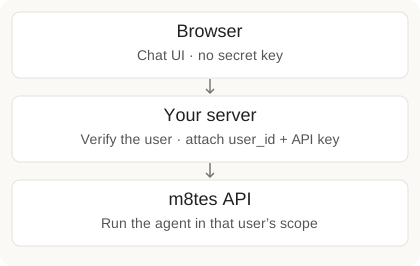
Keep the m8_ key on your server. The client refuses browser construction. Use React embed for a chat UI and server proxy.
Next: Quick Start · Runs · Embed a UI